Four timeframes
M1, M5, M15 and H1 — from the tick-by-tick picture to the shape of the session.

Platform
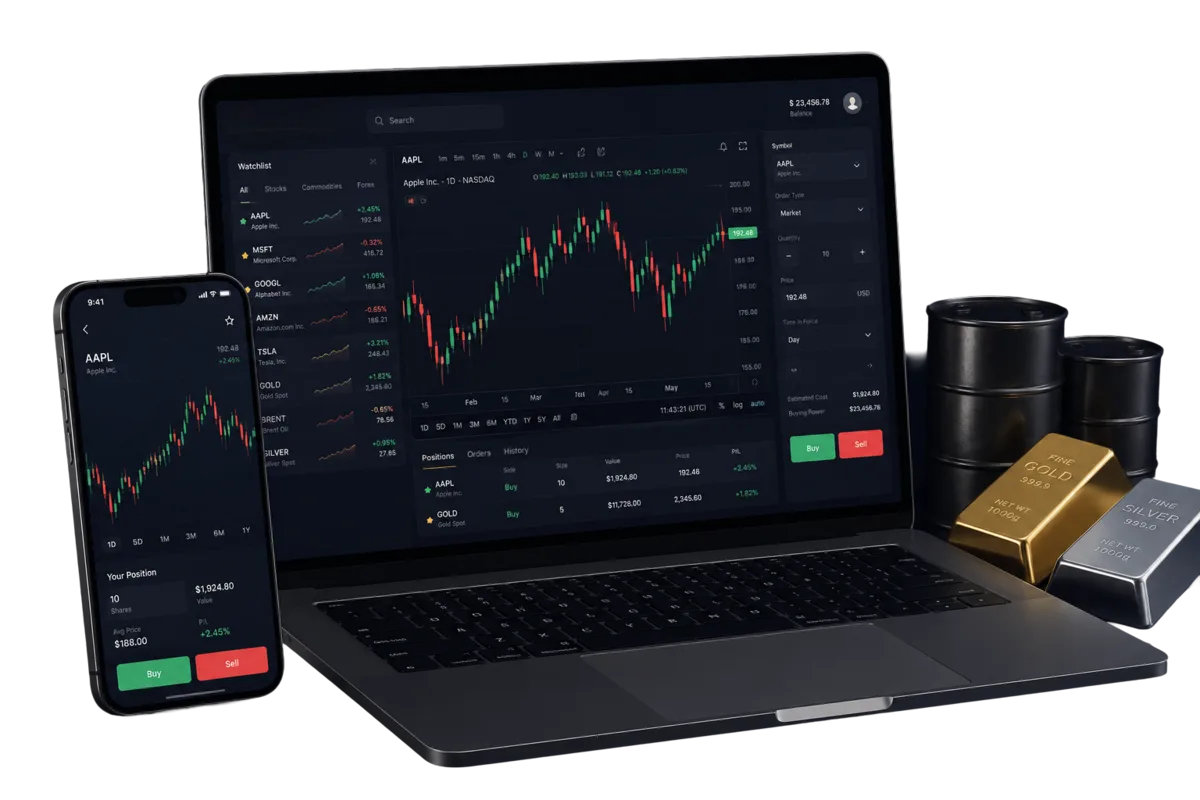
Prices, chart, order ticket and open positions on one screen. Nothing to install, nothing to update, and the same screen on a phone.
Web terminal
The terminal is a single page: your accounts on top, the instrument list beside the chart, the order ticket under it and your open positions below. No windows to arrange.
Nothing to install
It runs in the browser you already have. Sign in from any machine and your accounts, positions and history are there.
Several accounts, one login
Switch between your demo and live accounts from the same screen; balance, equity, free margin and margin level update with the choice.
Instruments grouped by market
Forex, stocks, indices, commodities and crypto in one list with live bid, ask and the 24-hour change, so you can scan before you pick.
Positions in view while you trade
Open positions sit under the ticket with their floating profit or loss, and closed ones move to the history with a ticket number you can quote to support.
Charts
The chart is built from the platform's own candle history and redraws as prices move.
Four timeframes
M1, M5, M15 and H1 — from the tick-by-tick picture to the shape of the session.
Candles, not decoration
Each candle carries open, high, low and close, so a single glance tells you where the price fought and where it gave up.
Chart and ticket together
The chart follows the instrument selected in the ticket, so what you analyse is what you are about to trade.
Orders
One ticket, filled at market, with the protective levels attached before or after the fill.
Market buy and sell
Pick a side and a volume and the position opens at the current ask (buy) or bid (sell). Volume is validated against the instrument's minimum, maximum and step.
Stop loss
The price where the position closes against you. Set it on the ticket at entry, or add and move it on an open position.
Take profit
The price where the position closes in your favour. Optional, editable, and equally available after the fill.
Close at market
Close a position whenever you like. The net result — profit or loss less commission and swap — lands on the account balance immediately.
Margin checked before the fill
An order that needs more margin than you have free is refused with the two numbers side by side, so you can resize instead of guessing.
Honest limits
It is worth knowing before you plan a strategy around it. These are current limits, not promises about the future.
No pending orders. There is no limit, stop or stop-limit entry — you open at market and manage the position afterwards.
No trailing stop. Stop loss and take profit are fixed levels; moving a stop behind the price is a manual step.
No partial close. A position closes in full; to scale out, open the size in separate tickets.
No technical indicators or drawing tools on the chart yet — it shows candles and timeframes.
No automated trading, scripts or third-party terminal bridges.
Mobile
The layout folds down to one column: chart, ticket and positions stacked, nothing removed. Open the site in your phone's browser and sign in — there is no separate app to download and no separate password to remember.
Works in the browser your phone already has
Same accounts, same positions, updated live
Deposits, withdrawals and support in the same session
Available in six languages, right-to-left included
Access
The terminal sits behind your client cabinet, so the account protections apply to it too.
Two-factor authentication
Optional and self-service: switch it on in your profile and confirm sign-in with a code from your authenticator app. Recovery codes are issued at the same time.
Verified e-mail for payouts
A withdrawal request needs a confirmed e-mail address, so a payout can never be arranged from an address you do not control.
Every action is logged
Sign-ins, orders, money movements and profile changes are written to an activity log the desk can replay if you ever query something.
Risk warning
Leveraged trading carries a high level of risk and can cost you your whole deposit. Prices move against you as easily as with you, and past movement says nothing about the next one. Trade only with money you can afford to lose, and be sure you understand margin before you open a position.
Not ready for that? A demo account uses virtual funds, so nothing is at stake while you learn.
A demo account opens the same screen with virtual funds. Nothing to install and nothing at risk.